Bytt mellom mine forskjellige GoDaddy Conversations -innbokser
Hvis du har mer enn ett prosjekt tilknyttet GoDaddy Conversations, kan du enkelt veksle mellom de forskjellige Conversations -enhetlige innbokser for å lese meldinger om det.
Note: The GoDaddy mobile app is not available with free Conversations plans.
- Any time a customer sends a message through any of the channels you’ve connected to GoDaddy Conversations, you’ll receive a notification on your mobile phone. The notification will tell you which business it’s for and who it’s from.

- Tap the notification to be taken directly to the conversation thread in the GoDaddy mobile app, from where you can respond to the message.
- To switch to an inbox for a different venture, from your inbox, tap your business name at the top of the screen. A list of your businesses will show.
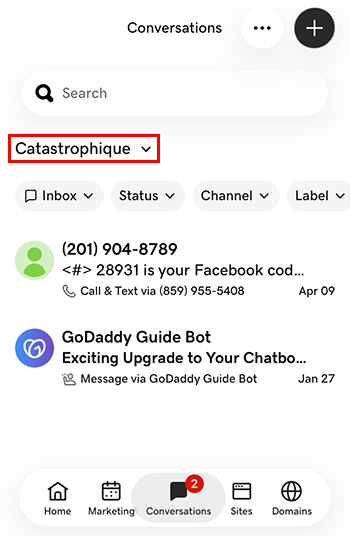
- Trykk på satsingen du vil bytte til. Du blir ført til innboksen for den satsingen.
- I en nettleser går du til GoDaddy -produktsiden for din.
Hvis du har den enkeltstående versjonen av Conversations, utvider du Conversations Unified Inbox . Velg Nettinnboks til høyre for Conversations -abonnementet.
ELLER
Hvis du har et Websites + Marketing -abonnement, blar du til Websites + Marketing og velger Administrer ved siden av nettstedet ditt. Utvid Conversations i menyen til venstre.
- Velg Innboks . En liste over de ikke -arkiverte samtalene vises.
- Velg en melding som skal føres direkte til samtaletråden, hvorfra du kan svare på meldingen.
- To switch to an inbox for a different venture, on the far left of your screen, select the venture you want to switch to. You’ll be taken to the dashboard for that venture.
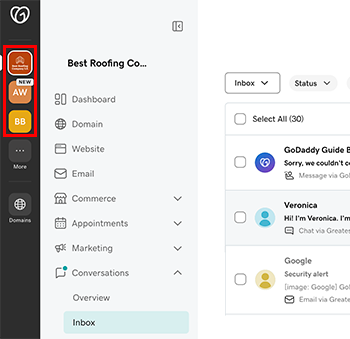
- I menyen til venstre utvider du Samtaler , og velger deretter Innboks som skal føres til innboksen for det arbeidet.