Koble Facebook -bedriftssiden min til GoDaddy Conversations
Koble GoDaddy Conversations til Facebook -bedriftssiden din for å holde kontakten med kunder som kontakter deg via Facebook Messenger eller kommenterer innleggene dine.
Merk: GoDaddy -mobilappen og muligheten til å koble til sosiale medier -kontoene dine er ikke tilgjengelig med gratis Conversations -abonnementer.
- Logg på GoDaddy -mobilappen din.
- Nederst på skjermen trykker du på Samtaler for å se en liste over alle ikke -arkiverte samtaler.

- Trykk på øverst til høyre
 mer , og trykk deretter på Innstillinger .
 - Trykk på Facebook . Du kan bli bedt om å logge på GoDaddy -kontoen din.
- Utvid Facebook , og trykk deretter på Koble til .
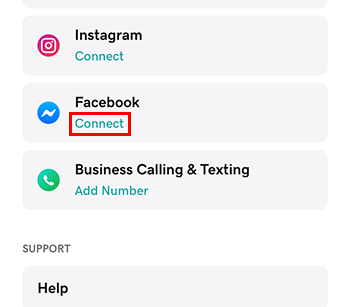 .
. - Logg på med Facebook -kontoen tilknyttet Facebook -bedriftssiden din. (Du kan bli bedt om å logge på Facebook -kontoen din først.) Påkrevd : Du må bruke en Facebook -bedriftsside. GoDaddy Conversations vil ikke fungere med personlige Facebook -sider. Les Opprett en bedriftsside for mer informasjon om hvordan du oppretter en Facebook -bedriftsside.
- Trykk på Fortsett .
- Velg Facebook -bedriftssiden du vil koble til.
- For å fullføre konfigureringen, trykker du på Fortsett .
- Logg på GoDaddy -mobilappen din.
- Nederst på skjermen trykker du på Samtaler for å se en liste over alle ikke -arkiverte samtaler.
- Trykk på øverst til høyre
 innstillingene .
 - Trykk på Facebook . Du kan bli bedt om å logge på GoDaddy -kontoen din.
- Utvid Facebook , og trykk deretter på Koble til . .
- Logg på med Facebook -kontoen tilknyttet Facebook -bedriftssiden din. (Du kan bli bedt om å logge på Facebook -kontoen din først.) Påkrevd : Du må bruke en Facebook -bedriftsside. GoDaddy Conversations vil ikke fungere med personlige Facebook -sider. Les Opprett en bedriftsside for mer informasjon om hvordan du oppretter en Facebook -bedriftsside.
- Trykk på Fortsett .
- Velg Facebook -bedriftssiden du vil koble til.
- For å fullføre oppsettet, trykker du på Fortsett .
- I en nettleser går du til GoDaddy -produktsiden for din.
Hvis du har den enkeltstående versjonen av Conversations, utvider du Conversations Unified Inbox . Velg Nettinnboks til høyre for Conversations -abonnementet.
ELLER
Hvis du har et Websites + Marketing -abonnement, blar du til Websites + Marketing og velger Administrer ved siden av nettstedet ditt. Utvid Conversations i menyen til venstre.
- Velg Innstillinger.
- Velg Kanaler
- Velg Koble til ved siden av Facebook .
- Logg på med Facebook -kontoen tilknyttet Facebook -bedriftssiden din. (Du kan bli bedt om å logge på Facebook -kontoen din først.) Påkrevd : Du må bruke en Facebook -bedriftsside. GoDaddy Conversations vil ikke fungere med personlige Facebook -sider. Les Opprett en bedriftsside for mer informasjon om hvordan du oppretter en Facebook -bedriftsside.
- Velg Facebook -bedriftssiden du vil koble til.
- For å fullføre oppsettet, trykker du på Fortsett .