Koble Conversations til e -postadressen min for Microsoft 365 fra GoDaddy
Link your Microsoft 365 email address to Conversations to get your emails directly in your Conversations unified inbox. If you’re a Websites + Marketing subscriber and you’re using a chat widget or web forms on your website, messages from those sources will also show in your Conversations box, through this email address.
- Logg på GoDaddy -mobilappen din.
- At the bottom of the screen, tap Conversations to see a list of all your unarchived conversations.

- In the top-right corner, tap
 more, and then tap Settings.
 - Tap Email. You may be asked to sign in to your GoDaddy account.
- Expand Email, and then tap Connect.
- Tap Microsoft 365, and then tap Next.
- Hvis du allerede har en Microsoft 365 -e -postadresse, vises den på skjermen. Hvis du ikke gjør det, vil du bli bedt om å få en før du kan fortsette med disse trinnene.
Velg e -postadressen du vil koble til Conversations, og trykk deretter på Fortsett .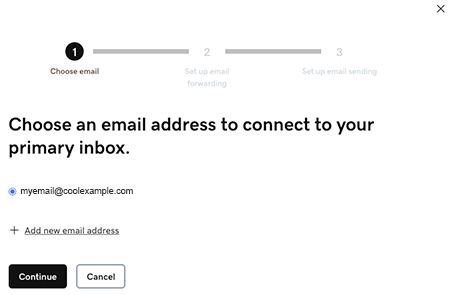
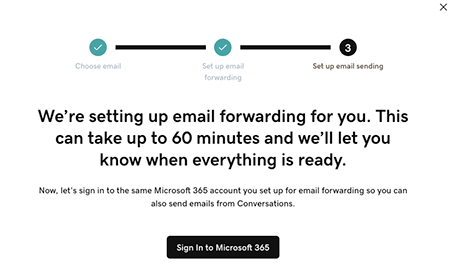
- Email forwarding will be set up for you. This could take up to 60 minutes, but you can continue setting up your email and we’ll let you know when forwarding is ready.
Sign in to the Microsoft 365 account you’re linking to Conversations. This must be the same account you used in Step 7.
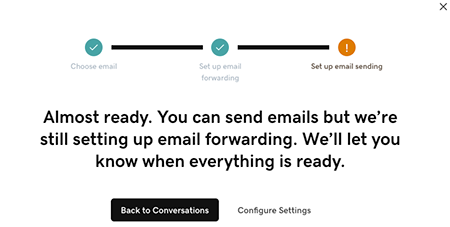
- Du vil se en skjerm som forklarer at e -posten din fortsatt blir konfigurert.
- Logg på GoDaddy -mobilappen din.
- At the bottom of the screen, tap Conversations to see a list of all your unarchived conversations.
- In the top-right corner, tap
 settings.
 - Tap Email. You may be asked to sign in to your GoDaddy account.
- Expand Email, and then tap Connect.
- Tap Microsoft 365, and then tap Next.
- Hvis du allerede har en Microsoft 365 -e -postadresse, vises den på skjermen. Hvis du ikke gjør det, vil du bli bedt om å få en før du kan fortsette med disse trinnene.
Velg e -postadressen du vil koble til Conversations, og trykk deretter på Fortsett . - Email forwarding will be set up for you. This could take up to 60 minutes, but you can continue setting up your email and we’ll let you know when forwarding is ready.
Sign in to the Microsoft 365 account you’re linking to Conversations. This must be the same account you used in Step 7.
- Du vil se en skjerm som forklarer at e -posten din fortsatt blir konfigurert.
- I en nettleser går du til GoDaddy -produktsiden for din.
Hvis du har den enkeltstående versjonen av Conversations, utvider du Conversations Unified Inbox . Velg Nettinnboks til høyre for Conversations -abonnementet.
ELLER
Hvis du har et Websites + Marketing -abonnement, blar du til Websites + Marketing og velger Administrer ved siden av nettstedet ditt. Utvid Conversations i menyen til venstre.
- Velg Innstillinger.
- Select Channels.
- Expand Email, and then tap Connect.
- Select Microsoft 365, and then tap Next.
- Hvis du allerede har en Microsoft 365 -e -postadresse, vises den på skjermen. Hvis du ikke gjør det, vil du bli bedt om å få en før du kan fortsette med disse trinnene.
Velg e -postadressen du vil koble til Conversations, og trykk deretter på Fortsett . - Email forwarding will be set up for you. This could take up to 60 minutes, but you can continue setting up your email and we’ll let you know when forwarding is ready.
Sign in to the Microsoft 365 account you’re linking to Conversations. This must be the same account you used in Step 7.
- Du vil se en skjerm som forklarer at e -posten din fortsatt blir konfigurert.
Gratulerer! Du har koblet e -postadressen din til GoDaddy Conversations. Når videresendingen er avsluttet, begynner du å motta e -postmeldingene dine direkte i Conversations -innboksen din.